LordOS review: a Debian desktop to try in a VM
A source review of its desktop, package and image versions, app isolation, licenses and the hardware evidence still missing.

LordOS makes a useful first impression: a desktop with its own visual language, a file manager, a calendar, a player and a store that reaches Debian applications. The harder question is what happens after the screenshot. Can a normal Linux program run, which permissions actually contain it, and what has the project tested on the machine you intend to use?
My assessment is to try LordOS in a disposable virtual machine before considering a main computer. Its public documentation is unusually specific about unfinished work. Those limits include hardware coverage, accessibility and an installation path that has never completed end to end. This is a review of the public source, documentation and release assets checked on November 5, 2026. I did not boot LordOS, install it or measure its performance.
A new desktop on Debian
The official site identifies LordOS as a Debian-based GNU/Linux distribution with its own desktop environment, display server and Wayland compositor written in C. Its interface uses React and QuickJS through its own rendering engine. Debian supplies the underlying distribution and a route to existing Linux applications; LordOS supplies much of the visible desktop and its native applications.

That division is interesting. The project can make choices about window behavior, settings and application design without writing a new kernel or replacing Debian's package collection. It also inherits integration work. A coherent native calendar does not establish that a particular GTK application, printer, graphics driver or laptop power state behaves correctly.
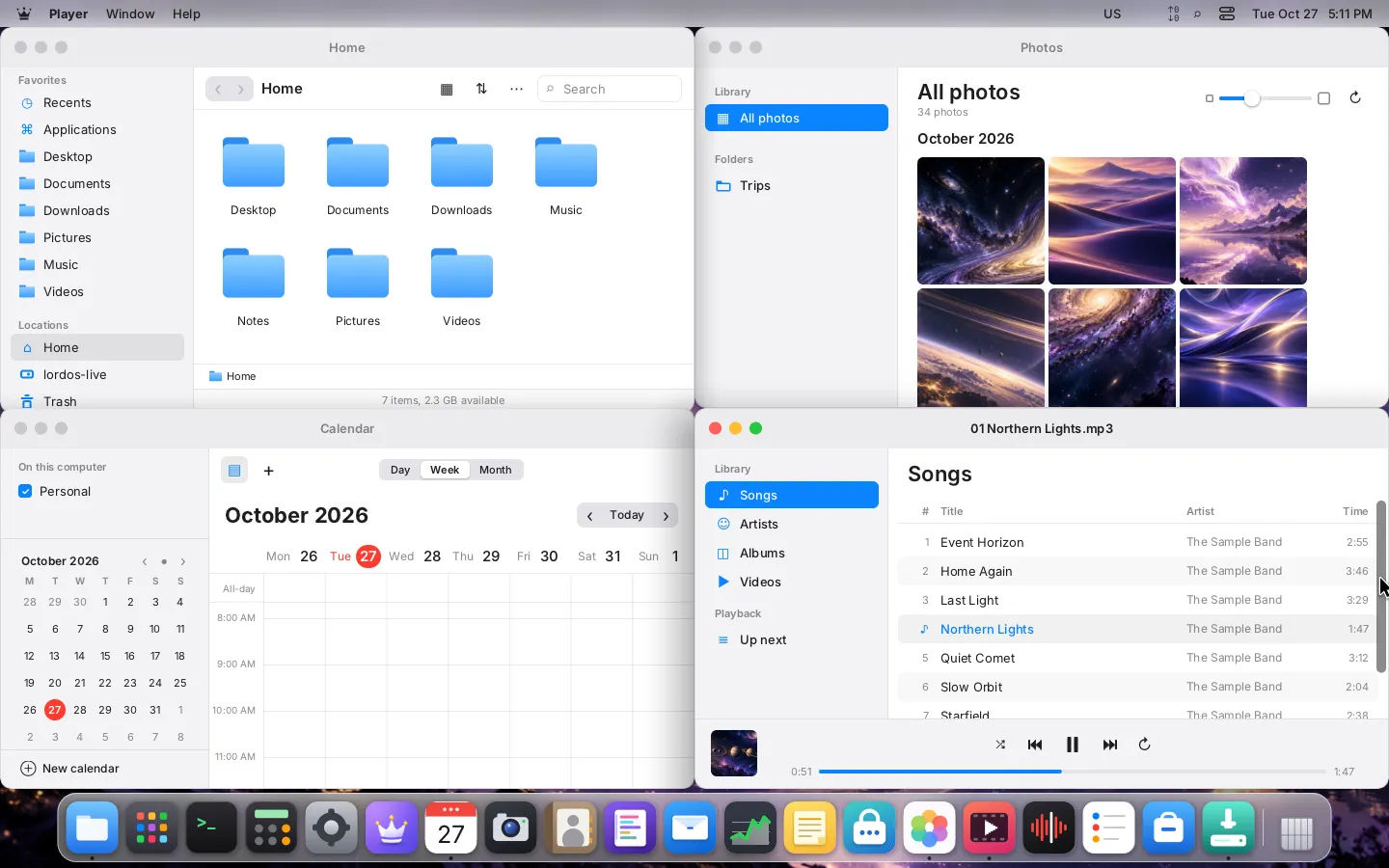
The project's screenshot notes matter here. Attractive captures establish a design direction. They cannot demonstrate audio quality, suspend and resume, a real display cable or whether an application saves its document correctly.
The latest package and the latest image differ
The 0.8.8.3-beta release, published on November 4 UTC, is a package update. Its release text says only the lordos package changes and that it incorporates 0.8.8.2, which was not published separately. The attached assets include amd64 and arm64 Debian packages, checksums, a signature and a public key.
The 0.8.8-beta release holds the ISO, OVA and Raspberry Pi image assets inspected for this review. Record the image version and the installed package version separately. The newer release's generic download table names images with the newer version, but those filenames were absent from its actual attached asset list when checked. Follow an existing downloadable asset, not an inferred filename.
This is a beta with ongoing fixes. The newer notes describe screenshot scaling fixes, a lock-screen return problem and a Wi-Fi wake recovery change that still needs confirmation on the reported hardware. Those notes are useful evidence of maintenance, while also giving a prospective tester specific behaviors to check.
Open source does not give every component one license
LordOS's own LICENSE is MIT. The third-party inventory lists separate terms for its libraries, fonts and data. It says the distributed lord-doc and lord-media helpers are GPL-covered because of their Poppler and Debian FFmpeg links.
There is another distinction for readers who require an entirely free-software system: the inventory lists Broadcom binary firmware from Debian's non-free-firmware collection on the images. Calling the project's own source MIT is accurate. Calling every byte of the complete distribution MIT, or assuming it contains no non-free firmware, would be wrong. Check the exact image and your own redistribution requirements against those component terms.
The app boundary depends on the kind of app
The privacy document separates installable .lpk applications, other built-in applications, Linux applications and terminal processes. Their isolation differs. It describes .lpk apps in their own process with a broker, Landlock, seccomp and per-app permissions. Some built-in apps remain inside the session process. Ordinary Linux applications are not sandboxed by default.
For Linux apps started through the launcher, restrictions can add namespaces, filesystem limits and other controls. The firewall document explains where those controls apply. A program launched outside the expected app scope is a different case. A network rule also does not imply the program cannot reach a clipboard or ask a system service to act.
Application type
  .lpk package: separate process, broker and sandbox
  Other built-ins: some remain in the session process
  Linux app: no default sandbox; selected restrictions depend on launch path

Inspect the exact app and restriction before trusting the boundary.
The paper's limitations say firewall "Ask" mode is not available as an interactive decision today. They list gaps involving BlueZ over D-Bus, the system bus, clipboard access and applications outside the launcher. Domain rules cannot see names resolved through an application's own encrypted DNS. The paper also describes a short window before a new PipeWire client is restricted. These are reasons to keep personal files and accounts out of an initial trial. They are not proof that an attack succeeded, and I have not independently audited the implementation.
Where the hardware evidence stops
The paper lists real AMD and Nvidia GPUs, real PC monitors, laptop functions, Bluetooth controllers, printers and scanners among untested areas. Its Raspberry Pi 5 evidence is narrower and tied to specified releases and setups. The 0.8.8 arm64 ISO and Raspberry Pi image shipped without being booted for that release, according to the limitations section. A prior emulated arm64 test cannot establish support for every physical ARM computer.
Secure Boot must be off; shim signing is pending. The package engine does not yet support i386 multiarch, so the paper says Steam is not offered. Readers needing a screen reader, zoom or high contrast should inspect the accessibility status before trying to replace an existing desktop. The paper says those features are not built yet, although other controls such as scaling and reduced motion exist.
One installation caveat deserves particular weight: the free-space installation path has not completed its copy, bootloader setup, firmware entry and reboot alongside another system. I would exclude dual boot from a first trial. A backup would help recovery, but it would not turn an untested installation path into a tested one.
The newer Raspberry Pi page reports a community test of 0.8.8 on a Pi 500 with 8 GB and a 4K display at 150% scaling. That adds a specific real-board result beyond the older paper; it does not validate every ARM machine. The page still notes poor window-drag frame rates in that setup. Treat hardware support as a versioned set of reports, not a blanket yes or no.
The support policy says only the latest beta receives fixes, including security fixes, with no backports before 1.0. Its updater description conflicts with newer release notes, which explicitly describe Store → Updates and apt. Use the current release notes for that path and budget time to keep the beta current.
What the small memory number measures
The homepage advertises 465 MB at idle and a 16-second boot. The paper gives their conditions: a live ISO virtual machine with 4 GB and four cores, idle after a minute, and a UEFI boot measured at 16.3 seconds. These are project measurements, not my benchmark and not a promise for an old laptop.
The same section distinguishes whole-system memory from a process's resident memory. Shared library pages make process RSS figures unsuitable for simple addition. If comparing desktops, use the same machine, the same idle interval and the same applications. Keep live media and installed-system results separate. A number without those conditions cannot settle which desktop is lighter for your workload.
A first trial with a useful stopping point
The virtual-machine page describes an amd64 OVA for VirtualBox and VMware, with four CPUs and 4 GB as the VM minimum and 16 GB described as ideal for many apps. Its virtual disk can grow to 32 GB. Check those requirements against the host before downloading; the small idle figure is not a minimum-memory recommendation.
My proposed trial uses a disposable guest with no personal accounts, host disks, shared folders or clipboard integration. Take a snapshot before updating. Verify downloaded checksums and the signature using the project's instructions and a public key whose provenance you have checked separately. A matching checksum alone does not authenticate the publisher. I have not performed that verification for an installed guest.
Inside the guest, a read-only starting record could be:
# Proposed guest-only observations; not executed for this review.
uname -m
dpkg-query -W lordos
free -m
Record the host, hypervisor, image filename and installed package version beside the output. Open a native app and an ordinary Linux app. Save and reopen an invented document, change display scaling, lock and unlock, then reboot. If testing a restriction, record how the app was launched, what rule was set and what observable access changed. An attractive permission panel alone is insufficient evidence.
Stop if the guest loses input, cannot return from lock or fails to reopen the saved file. Keep an issue report free of account details, local paths and identifiers you do not intend to publish. Passing these checks would justify a longer trial on that VM configuration. Physical hardware, daily work and security-sensitive use would still need their own evidence.
LordOS is worth watching for its attempt at a consistent Debian desktop and for documentation that exposes its own unfinished edges. I would give it an isolated VM and a written acceptance checklist. I would keep my working operating system until the exact hardware, accessibility needs and recovery path have been tested.